
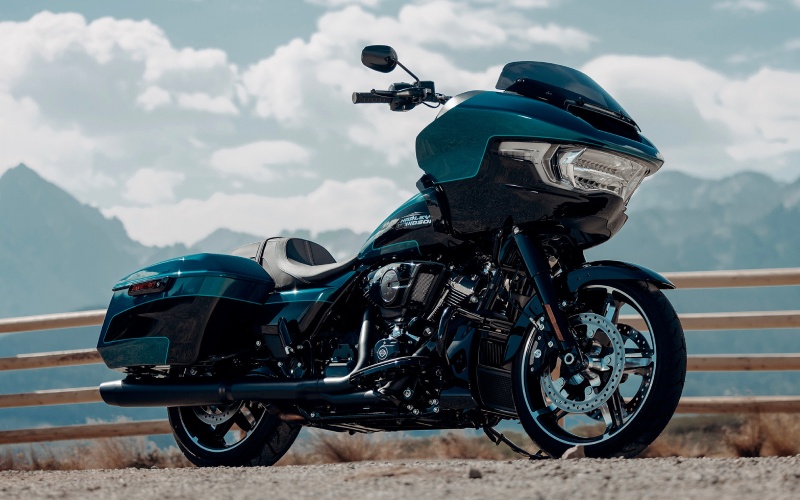
Freedom Valley Harley-Davidson® - Does Skyline™ OS on the 2026 Harley-Davidson® Road Glide® work wirelessly with Apple CarPlay for Whitehall Township, PA riders?
Riders comparing top-tier touring motorcycles want clarity on connectivity, and for good reason—this is the hub for maps, calls, and media across every mile. On the 2026 Harley-Davidson® Road Glide®, Skyline™ OS powers a 12.3-inch full color TFT that supports Apple CarPlay wirelessly or via USB-C, giving you flexibility to run your preferred setup without cluttering the cockpit.
What follows is a deeper look at how wireless CarPlay works on this platform, the gear you will want for best results, and a handful of practical tips to streamline everyday use around Whitehall Township, PA, and beyond.
How Wireless Apple CarPlay Works Here
The OEM specification for the 2026 Road Glide confirms Apple CarPlay compatibility wirelessly or wired. In practice, that means once your iPhone is paired and permissions are granted, CarPlay can launch automatically as the bike powers up and your device wakes, feeding navigation, calls, and media to the 12.3-inch TFT running Skyline™ OS. A USB-C port in the inner fairing provides a hardwired option for riders who prefer a physical connection or steady charging on long days.
Because CarPlay’s interface mirrors familiar iOS apps, you will navigate with minimal distraction—big, glanceable tiles, easy toggles, and Siri voice control for hands-free commands. Pairing is straightforward and usually a one-time task per device.
Quick Setup Checklist
Before you start, a minute of prep ensures a clean, reliable connection on every ride. Here is a simple checklist to follow the first time you connect.
- Update your iPhone: Install the latest iOS version and confirm Bluetooth and Wi-Fi are enabled.
- Enable Siri: CarPlay relies on voice control for safer operation at speed.
- Allow CarPlay when locked: In iOS settings, toggle “Allow CarPlay While Locked” so the display stays connected.
- Pair via Bluetooth: From the bike’s Skyline™ OS menu, add your phone; accept pairing prompts on both devices.
- Decide wired or wireless: Use USB-C for a hard link or stay wireless for a tidy cockpit—both are supported.
Once these boxes are checked, CarPlay integration becomes as automatic as starting the bike and rolling out. Most riders will find wireless connectivity is fast and stable for day-to-day use, while a cable is great for marathon days where battery conservation is key.
Audio and Calls at Speed
The Road Glide’s two 5.25-inch fairing speakers, powered by 50 watts per channel, make turn-by-turn prompts and music easy to hear at highway pace. For calls and intercom, Bluetooth headsets are supported, and rider/passenger VOX functions are available with H-D headsets (sold separately). That gives you the flexibility to keep private conversations in your helmet while reserving speakers for navigation and media.
Skyline™ OS also supports AM/FM, multiple voice recognition languages, and Bluetooth connections for your phone and headset. In short, you are not locked into a single audio workflow—configure it once and let the system do the heavy lifting every time you ride.
Navigation Tips for Everyday Riding
Apple Maps through CarPlay is a strong default for clear, timely prompts. If you prefer alternate routes or saved maps, you can run compatible navigation apps that support CarPlay. For rural stretches or spotty coverage, consider downloading offline maps on supported apps before you leave, and keep a USB-C cable in the fairing storage as a backup charging plan for long, screen-heavy days.
When you arrive, CarPlay typically shuts down as the bike powers off. If you want to keep directions running while parked, continue on your phone until you are ready to roll again.
Common Questions, Answered
Device compatibility and day-to-day usability come up often, so here are concise answers to the essentials.
- Is CarPlay really wireless on this model? Yes—per OEM specs, Apple CarPlay is supported wirelessly or via USB-C.
- Do I need a headset for CarPlay? No—navigation and media can play through the fairing speakers. A headset is recommended for calls and intercom.
- Can I control apps by voice? Yes—enable Siri and use voice prompts for calls, navigation, and media.
- What if my connection drops? Reopen Bluetooth settings to reconnect, or plug in via USB-C and continue wired.
This connectivity package is more than a spec sheet line—it reduces mental load in traffic, cleans up your cockpit, and lets you keep eyes up while your apps do the busywork.
Freedom Valley Harley-Davidson® is a knowledgeable resource for pairing help, headset recommendations, and cockpit setup, serving Norristown, Whitehall Township, and Lansdale with rider-first guidance. If you want to go deeper, we can also walk through Skyline™ OS interface options, from customizing home screens to selecting which data tiles you want front and center.
Between wireless CarPlay support, robust Bluetooth integration, and a crisp 12.3-inch TFT, the system brings modern touring convenience to the iconic Sharknose cockpit. Set it up once and let it streamline your next ride—whether that is a quick hop across town or a loop that turns into a day you did not want to end.