
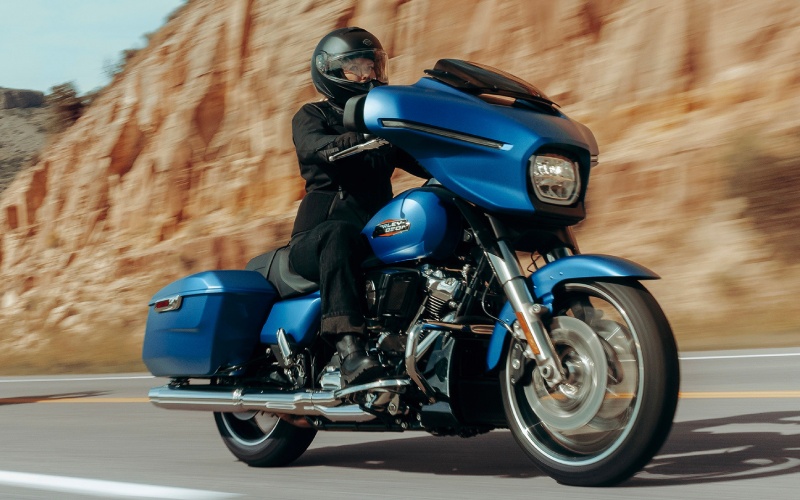
Freedom Valley Harley-Davidson® - Does Apple CarPlay work wirelessly on the 2026 Harley-Davidson® Street Glide® for riders around Lansdale, PA?
Modern touring is as much about clarity and control as it is about torque and comfort. If you’ve been eyeing the 2026 Harley-Davidson® Street Glide® and wondering how Apple CarPlay integrates on Skyline™ OS, here’s what to know about wireless connectivity, setup, and how the system supports real-world riding around Lansdale, PA.
What Apple CarPlay Does on Skyline OS
On the Street Glide®, Skyline™ OS centers around a 12.3 in. full-color TFT display with an interface built for gloved hands and quick glanceability. Apple CarPlay works wireless or wired, letting you mirror key iPhone functions for on-the-go essentials—turn-by-turn navigation, music, calls, and messages—while keeping your phone tucked safely away. Bluetooth support extends to phone, media player, and compatible headsets, and the system also offers rider/passenger intercom support with Harley-Davidson® headsets sold separately (VOX is available for H-D headsets). It’s a cockpit designed to simplify the ride, not distract from it.
Wireless vs. Wired: What You Need
Wireless CarPlay is fantastic for daily rides around Bethlehem Pike or longer stretches toward US-202, minimizing cables and clutter. Wired CarPlay still has its place when you want on-the-spot charging via USB-C or a hardline connection for maximum stability on marathon days.
- Step 1: Ensure your iPhone has current software and that Bluetooth and Wi-Fi are enabled.
- Step 2: On the Street Glide® display, open the phone pairing menu in Skyline™ OS to begin first-time pairing.
- Step 3: Select your motorcycle from the Bluetooth list on your iPhone and confirm the pairing codes on-screen.
- Step 4: When prompted, enable Apple CarPlay and accept the permissions on your phone; choose wireless or plug into the USB-C port for a wired session.
- Step 5: For voice prompts and hands-free calls, pair a compatible headset; audio mixing and intercom are supported when using Harley-Davidson® headsets (VOX available).
After the first pairing, subsequent wireless connections typically happen automatically when you power up the bike, and your phone is within range. For wired sessions, connect via USB-C and follow the on-screen prompts; CarPlay should load in a few seconds.
Controls, Audio, and Voice
Skyline™ OS is designed so primary controls become second nature. The 12.3 in. display presents crisp mapping, large touch targets, and media screens that minimize menu diving. Use your preferred combination of touchscreen interactions (as conditions allow), handlebar controls, or voice assistance. Voice recognition for tuner, media, and navigation supports multiple languages, while phone voice functions remain phone-dependent. Two 5.25 in. fairing speakers powered by 50 watts per channel provide clear, robust sound that holds up along PA-63 and beyond.
- Navigation: Launch Apple Maps within CarPlay for turn-by-turn directions that render cleanly on the TFT screen.
- Music: Stream playlists, podcasts, or audiobooks; handlebar controls help you manage tracks without digging into menus.
- Calls and Messages: Keep your gloves on and your eyes forward with voice-initiated calls and message dictation.
- Rider/Passenger Intercom: Pair compatible H-D headsets for intercom and VOX functionality, keeping conversations clear at highway speed.
Tips for Lansdale, PA Riders
Local riding often mixes small-town streets with quick highway hops. If your day swings from Lansdale Borough traffic to faster runs on the Turnpike connector, set your destination and playlists before rolling out. Save common routes—favorite coffee stops on Main Street, a loop toward Green Lane, or a weekend ride to Valley Forge—so you can launch navigation with minimal taps. For longer trips, wired CarPlay via USB-C keeps your phone topped off while maintaining a direct link for hours of continuous navigation and streaming.
Frequently Asked Questions:
Do I need a headset to use Apple CarPlay on the Street Glide®?
A compatible headset is strongly recommended for voice prompts, calls, intercom, and hands-free control. Harley-Davidson® headsets are sold separately, and VOX is available for H-D headsets.
Can I use CarPlay wirelessly and then switch to wired during the same ride?
Yes. You can start wirelessly and, if you want, charge or a hardline connection, plug into the USB-C port, and follow the on-screen prompt. The system will transition to the wired session.
Does Skyline™ OS support languages for voice recognition?
Yes. Skyline™ OS supports multiple interface and voice recognition languages for tuner/media/navigation. Phone voice functions remain phone-dependent.
What if I don’t use Apple devices?
Skyline™ OS supports Bluetooth for phone and media across many devices, so you can still stream audio and manage calls without Apple CarPlay.
If you’d like help tailoring your cockpit—optimizing audio, pairing headsets, or organizing your navigation screens—connect with Freedom Valley Harley-Davidson®. Our team is serving Norristown, Whitehall Township, and Lansdale with setup guidance grounded in real-world touring experience, so your Street Glide® feels dialed in from day one.